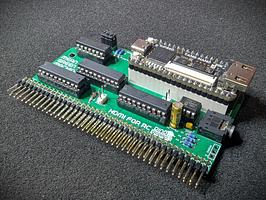
This product was designed by Dino Boards.
By buying this product you support original hardware creators.


Turbo Charge your RC2014/RCBus system
Description
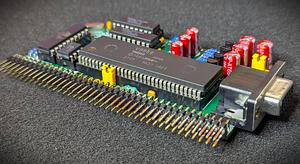
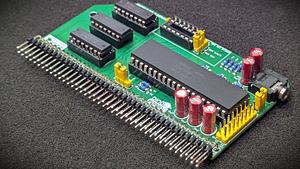
Give your RC2014/RCBus system the full power of a Z80 running at 20Mhz, yet still be broadly compatible with original software and your other RC2014/RCBus modules.
This kit is an updated alternative to the Turbo CPU Module Designed for RC2014. The full differences are listed below.
What is it?
This module is designed to replace your existing RC2014/RCBus CPU and give you the full power of a Z80 running at 20Mhz, yet still be broadly compatible with original software and your other RC2014/RCBus modules.
For a system configured to run a full MSX configuration, you typically need to run your CPU at approximately 3.5Mhz, as software written for the platform at the time, would assume your system was clocked at this speed. If you attempt to run programs at a higher cpu clock speed, you will probably get video corruption, I/O problems — it just wont work!.
But these days, its possible to buy a brand new Zilog Z80 chip, rated at 20Mhz (Z84C0020PEG). For me in the mid 80s, that would have been an unimaginable speed!
We achieve compatibility by applying a combination of hardware wait states (pausing the CPU for a bit) and automatically slowing the clock down to the 3.5Mhz for short periods of time when the CPU is interacting with your other modules.
A 3 way slider, soldered on the front of the module, gives you total control of the CPU speed. Using this switch, you can at any time switch into 1 of 3 modes:
- Full 20Mhz clock speed, with 1 wait state when accessing memory, and slows the clock to 3.5Mhz for 31 clock cycles when it accesses IO devices (SIO/2, PPI, V9958 etc).
- Full 20Mhz clock speed as mode 1, but with 3 wait states for accessing memory.
- Standard MSX speed 3.5Mhz CPU, M1 Wait state for accessing memory.
Despite the extra wait states and clock slow down, I have found a typical speed improvement of between 4 and 5 times faster – even for software the does lots of interactions with the V9958, you can still see a very large improvement.
Key features:
- Support Z80 running at 20Mhz
- 3 way slider to select fast, medium or standard speeds
- Blinky Leds to indicate turbo mode and clock slow down states
Compatibility
I have tested running at 20Mhz on my specific back-plane and set of modules without any problems. But due to differences in combination and configuration of RC2014 kits – you may find with your specific situation, there are signal degradation issues at 20Mhz that may cause non-reliable operation. You can use the 3 way slider to force the module to operator at a lower speed.
What else do I need to make this work?
You need a RC2014/RCBus build. This can be configured with MSX modules or other RC2014/RCBus modules.
I have tested on a conventional RC2014 build and with the MSX Modules.
It will replace your RC2014 CPU.
Unlike the Yellow Turbo CPU Module, this module still requires an external clock source (slow-clock). This slow clock can be generated using any RC2014/RCBus clock modules (eg: The RC2014 Dual Clock Module). You can also use the V99x8 RGB Video modules, with their appropriate jumper settings to create a ‘slow clock’ signal onto the CLK1 bus lane.
Key difference with Yellow Turbo CPU
| Description | Yellow MSX Version | Green Stegosaur Version |
|---|---|---|
| Turbo Clock | On board 20Mhz | On board 20Mhz |
| Slow Clock (CLK1) | On board with selectable rates from 0.3072Mhz to 7.3728Mhz | Requires external slow clock |
| Clock (CLK2) | On board with selectable rates from 0.3072Mhz to 7.3728Mhz | None |
| External Slow Clock Source | Optional via jumpers | Required |
| Power On Reset | None | Enabled from version 1.1 and above |
| PCB Height | 8.0 cm | 5.5 cm |
| Colour | Yellow | Green |
What’s included in this kit The kit includes the PCB and components (passive components, crystals, sockets, connectors and other ICs). The Z80 can optionally be included or you can source your own.
The PLD chips are supplied new and programmed for immediate operation.
Product Details
For full product description, construction notes and other help – please see the main guide page Stegosaurs Turbo CPU
Links to code and documentation
Documentation (dinoboards.com.au)
Shipping policy
Normally shipped next working day, however during busy periods this may extend slightly.
It is your responsibility to pay any import duty or other taxes where appropriate, unless specified below:
For EU locations:
- Please see Lectronz's Terms and Condititions (https://lectronz.com/pages/terms_and_conditions)
- For order 150 EUR or over, it will be your responsibility to pay any import duty or other taxes where appropriate.
For USA: A 10% Tariff tax is applied at checkout. Tariffs are prepaid by me prior to shipping. You will not incur any additional tariff charges, upon receipt of your package.
For Australia: Registered for GST. Prices are listed exclusive of GST. GST of 10% is applied at checkout.
Here are some extras that might be useful for your project!
Stegosaur Turbo CPU for RC2014/RCBus
Sold by Dino Boards
$29.25
$32.18 with tax in United States [change]
Stock available: 1
The seller

Reliving the 80s thru retro computing